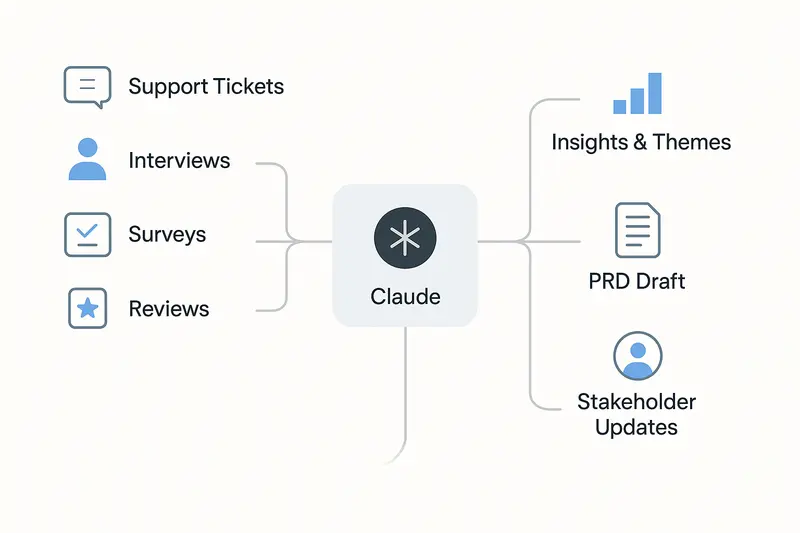
Claude.ai is changing how product managers work. Tasks that used to take days of synthesis, planning, and writing can now be compressed into hours, often with better structure and clearer thinking along the way.
For PMs, that matters because the job is not just about making decisions. It is about absorbing large volumes of input, identifying patterns, aligning teams, communicating clearly, and constantly switching between strategic and tactical work. Claude is especially useful in that environment because it helps reduce the mental overhead of synthesis, drafting, and organization, leaving more room for the judgment calls that actually define strong product management.
This guide explains why Claude has become so useful for PMs, where it creates the most leverage in everyday work, how to prompt it effectively, and which practical workflows and templates are worth adopting right away.
Why Claude Matters for Product Managers
Product managers sit at the center of an unusually messy information system. Customer feedback, internal stakeholder requests, roadmap debates, technical limitations, market signals, and business goals all need to be translated into clear product decisions. That work is cognitively expensive, and a lot of it is repetitive.
Claude is valuable because it handles exactly the kind of work that burns PM time without always requiring PM judgment. It can synthesize raw input, structure messy notes, generate strong first drafts, organize competing ideas, and tailor communication for different audiences. Used well, it does not replace product thinking. It creates more space for it.
Teams that use Claude effectively tend to report three consistent benefits:
- less time spent on manual synthesis and documentation
- stronger first drafts and better-structured thinking
- more time for strategy, customer understanding, and prioritization
That last point is the real win. The point is not to offload product management to AI. The point is to spend less time on formatting and summarizing, and more time on decisions that actually matter.
Where Claude Fits Best in the Daily PM Workflow
Claude is most useful when applied to recurring workflows that happen constantly in product work but are hard to do quickly and well at the same time. The strongest PMs do not use Claude as an oracle. They use it as a collaborator that handles synthesis, structure, and draft generation while they stay responsible for judgment, prioritization, and direction.
Synthesizing Customer Feedback at Scale
Turning raw customer input into usable insight is one of the most painful parts of product management. Support tickets, surveys, interviews, sales calls, and reviews all contain useful signals, but it takes serious effort to identify patterns across them.
Claude is very good at processing large volumes of this material and turning it into structured insight. It can help identify:
- recurring pain points
- common feature requests
- objections and buying triggers
- competitor mentions
- language customers use to describe value
- contradictions between what users say and what they actually prioritize
That means you can move from a pile of transcripts or tickets to a ranked list of themes much faster. It is especially useful when you want to compare frequency against severity, cluster similar comments, or extract direct quotes that preserve the customer’s language.
Used consistently, this workflow can also become a living source of customer intelligence rather than a one-off analysis exercise.
Writing PRDs and Feature Specs Faster
PRDs are one of the highest-leverage documents a PM creates, but they are also slow to write well. A good PRD requires synthesis, clarity, structure, edge cases, success metrics, and alignment across multiple stakeholders.
Claude helps most when used as a drafting partner, not as the final author.
A strong workflow looks like this:
- dump in your research, rough notes, and known requirements
- ask Claude to create a structured first draft
- review it critically and fill in the missing judgment
- iterate until the logic, trade-offs, and wording reflect the real product thinking
This works because Claude is fast at structure. It can turn rough inputs into a usable outline with problem statements, user stories, acceptance criteria, risks, and open questions. That removes blank-page friction and gives you something concrete to improve.
The final document still needs human ownership. But the time savings are real, and the first draft is usually much better than starting from zero.
Drafting Stakeholder Updates and Executive Communication
PMs spend a huge amount of time translating the same core information for different audiences. The challenge is not just writing clearly. It is changing emphasis depending on who is reading.
Executives care about business impact and risk. Engineering cares about constraints and dependencies. Sales cares about customer value and positioning. Finance cares about cost, timing, and resource implications.
Claude is extremely useful here because it can take one source document and generate multiple targeted versions for different audiences. That means less time rewriting the same material over and over, and more time checking whether the message is actually correct.
Prioritizing Work With Better Structure
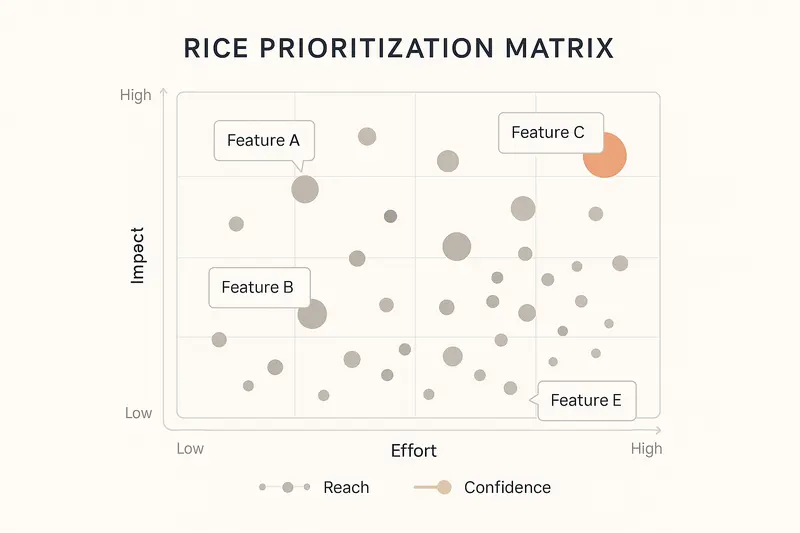
Prioritization is one of the hardest parts of product management because it mixes analysis with politics. Teams say they use frameworks, but many decisions still get shaped by whoever speaks loudest or has the most influence.
Claude is helpful when paired with a framework like RICE because it forces explicit thinking. If you want a real prioritization output, you need to define reach, impact, confidence, and effort. That alone improves the quality of the discussion.
Claude can help calculate scores, compare trade-offs, flag weak assumptions, identify quick wins versus big bets, and highlight where confidence is too low to make a strong decision yet. It does not remove subjectivity, but it makes the subjectivity visible.
That is a big improvement over vague prioritization discussions dressed up as strategy.
Processing Meeting Notes Into Action
Most meetings do not fail because people were absent. They fail because nobody leaves with the same understanding of what was decided.
Claude is good at turning messy meeting notes into something useful. It can extract:
- decisions made
- action items and owners
- open questions
- dependencies and blockers
- concise summaries for sharing
A particularly useful move is asking Claude to summarize a meeting from different perspectives, such as product, engineering, leadership, or customer impact. If those summaries feel misaligned, that is usually a signal that the meeting itself was not as clear as people assumed.
Brainstorming Solutions and Surfacing Edge Cases
Claude can also be a useful thought partner when you are early in the problem-solving process. If you are trying to explore multiple solution directions, it can generate alternatives, compare approaches, and point out risks and implementation concerns.
It is also good at edge case discovery. That is valuable because product teams often underinvest in edge cases until engineering or QA finds them too late. Claude can help identify issues around permissions, missing data, scale, unusual states, or failure modes before they become launch blockers.
How to Prompt Claude Effectively as a PM
The difference between mediocre output and genuinely useful output usually comes down to prompting. Claude is not magic. It performs best when you give it enough context, clear constraints, and a specific format.
Give It Real Context
Claude does not know your users, your roadmap, your constraints, or your internal language unless you tell it.
A vague request like “Help me write a PRD” will produce a vague answer. A specific prompt that explains your product, users, competitive context, and constraints will produce something much more relevant.
Think of Claude as a very capable new team member. Smart, fast, and useful - but still new. If you skip the briefing, the output will reflect that.
Use Roles Carefully
Do not ask Claude to be your final decision-maker. That is where people get sloppy.
Instead of asking, “Which feature should we build?”, ask it to analyze trade-offs, generate arguments from different perspectives, or identify missing assumptions. Let Claude do analysis. Keep the decision with yourself.
That framing is healthier and produces better work.
Be Explicit About Format
If you want bullets, ask for bullets. If you want a markdown table, ask for a markdown table. If you want a document outline, JSON structure, or presentation-style summary, say so directly.
Otherwise, Claude will default to prose, and prose is often not the most useful format for product work.
Use Examples
If you want Claude to match a certain tone, structure, or output style, show it an example. This is one of the highest-leverage prompt improvements and one of the most underused.
A good example beats a long explanation almost every time.
Break Big Tasks Into Steps
If the task is large, do not throw everything into one prompt and hope for brilliance.
Break it down. Have Claude identify themes first, then evaluate trade-offs, then draft a structured output. Sequential prompting usually gives better results because it keeps each step focused and gives you a chance to redirect the work before it drifts.
Tell It to Flag Uncertainty
Claude will try to be helpful, and sometimes that means sounding more certain than it should.
You can reduce this by explicitly telling it: if something is unclear, unsupported, or likely to be a guess, say so directly. That is especially important when discussing competitors, market claims, technical feasibility, or anything else that could lead to bad decisions if wrong.
Copy-and-Use Prompt Templates for PM Work
Here are practical templates you can use right away.
Customer Feedback Analysis
I'm analyzing customer feedback to identify patterns and prioritize improvements.

Product context:
[Describe the product, ICP, and current positioning]

Problems we're focused on:
[List the main problems we're trying to solve]

Customer feedback:
[Paste interviews, surveys, tickets, reviews, or call notes]

Please analyze this and provide:
1. Top pain points ranked by frequency and severity
2. Feature requests grouped by theme
3. Competitive mentions
4. Buying triggers
5. Success metrics customers care about
6. Objections and blockers
7. Strong direct quotes that capture customer language

For each section, include frequency estimates, representative quotes, and anything that seems surprising or contradicts our assumptions.
PRD First Draft
I'm writing a PRD for [feature name]. I'm providing research notes, rough thinking, and known requirements. Please generate a strong first draft.

Product context:
- Product and positioning: [describe]
- Users: [describe ICP and current usage]
- Competitive context: [describe alternatives]

Research input:
[Paste interviews, research synthesis, strategic notes, competitor findings]

Known requirements:
[List anything already decided]

Constraints:
[Timeline, technical limitations, dependencies, resources]

Please generate a PRD with:
1. Problem statement
2. Solution overview
3. User stories with acceptance criteria
4. Technical requirements
5. Success metrics
6. Edge cases
7. Open questions
8. Risks and mitigations

Use clear, specific language. Avoid generic phrases like "improve the experience."
RICE Prioritization
I need to prioritize these features using RICE.

Product context:
- Monthly active users: [number]
- Core funnels: [describe]
- Main bottlenecks: [describe]

Features:
1. [Feature A]: [description]
2. [Feature B]: [description]
3. [Feature C]: [description]

For each feature, here are my current estimates:
- Reach: [number]
- Impact: [0.25 / 0.5 / 1 / 2 / 3]
- Confidence: [0-100%]
- Effort: [person-months]

Please provide:
1. Ranked features by RICE score
2. Estimates that seem weak or unrealistic
3. Quick wins
4. Big bets
5. What research would improve low-confidence items
6. Dependencies or sequencing issues
Stakeholder Update
I'm preparing an update for [stakeholder type].

Their main concern:
[What matters most to them]

Their role in decisions:
[What they influence]

Their background:
[Technical, business, product, etc.]

What I need to communicate:
- Progress: [what happened]
- Challenges: [what is blocked or slower than planned]
- Asks: [what I need from them]

Additional context:
[Paste relevant strategy, status notes, or background]

Please generate a [brief / email / outline] that:
1. Opens with what matters most to this stakeholder
2. Anticipates likely objections or concerns
3. Uses evidence where relevant
4. Ends with a specific ask or recommendation
5. Uses a [professional / concise / direct] tone
Edge Case Identification
I'm designing [feature name] and want to identify realistic edge cases before implementation.

Feature:
[Describe what users can do]

Technical context:
[Describe permissions, data model, constraints, integrations]

Customer context:
[Describe user types, scale, usage patterns]

Please identify edge cases across:
1. Permissions and access
2. Data quality and missing data
3. Unusual system states
4. Scale
5. Failure modes
6. Integrations

For each edge case, include:
- the scenario
- why it matters
- how we should handle it
- whether it should block launch or can wait until V2
Common Mistakes to Avoid
Using Claude as a Strategist Instead of a Tool for Strategy Work
Claude can generate impressive strategic writing, but that does not mean it owns the strategy. It can help you think through options, pressure-test logic, and structure analysis. It should not make the final call for you.
If you outsource judgment, you are doing the job badly.
Giving Too Little Context
This is probably the most common mistake. PMs often give Claude just enough information to technically answer the question, but not enough to answer it well.
The result is generic output that sounds decent but is not actually useful.
Trusting It Blindly
Claude can sound convincing even when it is wrong. That matters a lot in product work, especially around market claims, competitor features, technical assumptions, and anything tied to real business decisions.
Review the output critically. Verify important facts. Do not confuse fluency with accuracy.
Sharing Sensitive Information
This one is simple: do not paste confidential information into an AI tool unless that is explicitly approved and compliant with your company’s policies.
Redact names. Generalize sensitive figures. Remove personally identifiable information. Keep the useful context, not the risky detail.
Asking Vague Questions
A vague prompt usually means your own thinking is still fuzzy. Claude will reflect that fuzziness back to you in polished language.
Be specific. If needed, ask Claude to help you clarify the question before asking it to solve the problem.
Best Practices for Making Claude Part of Your Workflow
Build a Prompt Library
Save the prompts that work. Do not reinvent them every week.
Keep a simple internal library for recurring tasks like PRDs, customer feedback analysis, prioritization, stakeholder updates, edge case reviews, and competitive summaries. Over time, these become much more useful than generic templates because they are tuned to your product, market, and style.
Use It for First Drafts, Not Finished Work
This is the healthiest default.
Claude is great at getting you from zero to something structured and useful. But the final layer - judgment, nuance, trade-offs, tone, and factual accuracy - still needs your review.
Use It to Organize Your Thinking
Some of the best use cases are not about output at all. They are about clarity.
Claude can help you break down messy problems, identify weak assumptions, compare options, and structure your reasoning. That kind of support is often more valuable than a polished document.
Separate Work Streams
If you are working across different products or strategic threads, keep those contexts separate. The clearer the context, the better the output. If you use project-based workspaces, this becomes even easier.
Hold It to Real Standards
Treat Claude output the same way you would treat output from a capable teammate. Review it. Challenge it. Rewrite it. Push for specificity. Reject vague or lazy phrasing.
The more rigor you apply, the more useful it becomes.
How to Start Without Overcomplicating It
If you are new to using Claude for PM work, do not try to apply it everywhere on day one.
Start with one workflow where the value is obvious. Customer feedback synthesis is a strong option. PRD drafting is another. Prioritization is also a good starting point.
Use it repeatedly for that task until the workflow feels natural. Save the prompt. Improve it. Then add another use case.
That approach works better than trying to transform your whole process overnight.
Conclusion: Claude as a Real Lever for PM Work
Claude is not valuable because it produces polished text. It is valuable because it helps product managers spend less time on mechanical work and more time on real product thinking.
When used well, it can dramatically reduce the time spent on synthesis, documentation, and communication while improving structure and clarity. That gives PMs more bandwidth for the things that still require human judgment: understanding users, navigating trade-offs, aligning teams, and making decisions under uncertainty.
The product managers getting the most from Claude are not using it as a shortcut for thinking. They are using it to support better thinking, faster execution, and stronger communication.
If you want more practical workflows and prompts for PM , you can also check out this practical playbook on ChatGPT for product managers.
The real advantage is not just speed. It is better structure, sharper questions, and more time for the part of the job that actually matters.
Start with one repetitive workflow. Use Claude on it this week. Improve the prompt once. Save it. Then do the same for the next one.
That is how this becomes a real system instead of just another tool.